8 Best Electrician Websites in Australia (2026)
 Pat FongFounder, ServiceScalePublished 13 April 2026 · Updated 14 October 2026 · 19 min read
Key takeaways
- Your electrician website is either winning you jobs while you sleep - or it's quietly sending customers straight to your competitors.
- Strip away the differences and the strongest entries here share the same handful of things: a Google rating you can see without scrolling, a service area with real suburb names, and at least one ge...
- The problem usually isn't design in the abstract - it's that most sites stop at "technically functional" and never reach "genuinely distinctive." A lot of electrician websites look fine on a deskto...
- Before you think about colours, fonts, or whether to add a blog, focus on the elements that directly produce enquiries.
- Run your current site through this honestly.
Your electrician website is either winning you jobs while you sleep - or it's quietly sending customers straight to your competitors. If you're not sure which one it is, you're about to find out.
We started this list at 10, then tightened the bar hard: a real, above-the-fold Google rating became a hard requirement, not "shown somewhere on the page," and we specifically went looking for genuinely distinctive design and voice, not just checklist compliance. Under that bar, four of our original picks got cut. Two of the eight that remain - Adamos Electrical and MCP Electrical - are businesses we built the websites for. We're not going to bury that, and we're not going to grade them on a curve either: both are judged by the exact same fold-placement standard as the other six. Adamos holds up under it; MCP's proof is weaker-placed, which the entry below says plainly.
One honest finding from the research: no Australian electrician business shows up on Awwwards or similar design-award platforms - that tier of web design simply hasn't reached this trade yet in this market. The realistic ceiling is genuine industry recognition (NECA, Master Electricians Australia) paired with a review-forward, distinctively-voiced site. One business on this list clears that bar outright.
Related: Automation or AI: The Single Question That Reveals What Your Business Needs
Related: Before & After Posts: Instagram Strategy for Tradies
The 8 Electrician Websites That Actually Clear the Bar
1. Westline Electrical Services — Perth, WA
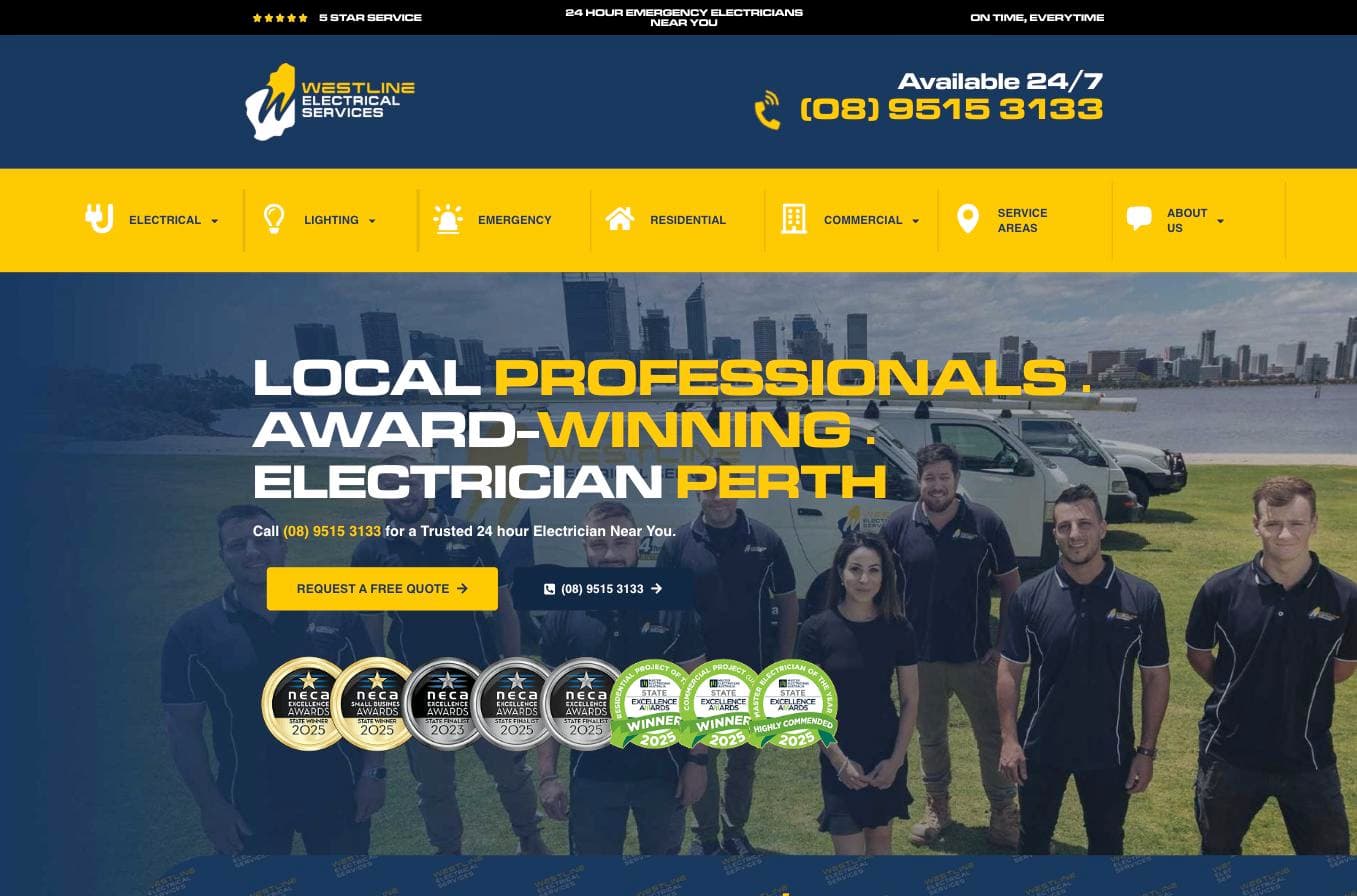
The standout of this list, and the only one with genuine third-party validation to back up the design. "5.0 stars based on 532 reviews" sits in the header before any scroll. Below the headline - "LOCAL PROFESSIONALS. AWARD-WINNING ELECTRICIAN PERTH" - sit eight real award badges: NECA Excellence Awards State Winner and State Finalist, plus a 2025 Master Electricians Australia Excellence Awards double win (Residential and Commercial Project of the Year). The hero photo is the real team - seven people in branded uniforms in front of branded vans, not stock. Licence EC11867 is listed, and director Jordan Vellutini is named and quoted, not hidden behind a generic "our team" line.
What to steal: real industry award badges do more trust-building work than another testimonial widget - and unlike a star rating, a competitor can't fake one.
2. Luno Electrical — Melbourne, VIC
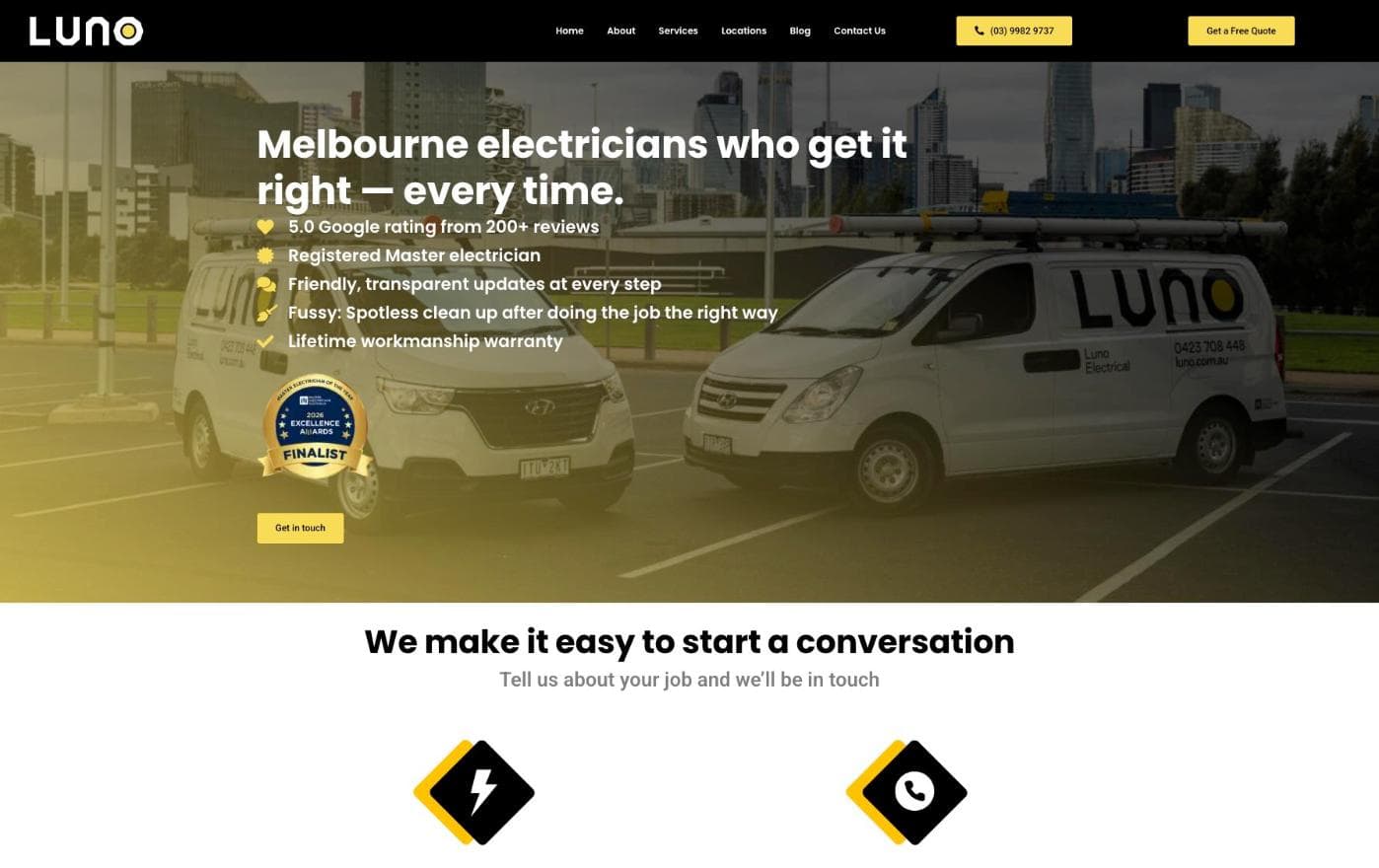
The best voice and design system on this list. "5.0 Google rating from 200+ reviews" is the literal first bullet under the headline - "Melbourne electricians who get it right - every time." The copy is genuinely distinctive, not interchangeable trade-site boilerplate: "We're a friendly bunch who take the work seriously and ourselves a little less so." A "2026 Excellence Awards Finalist" badge sits in the hero alongside real branded van photography. 23 named suburbs across Melbourne's inner-east and bayside (Hawthorn, Kew, South Yarra, Toorak, Brighton, Sandringham). Licence REC 25989 and ABN shown. The standout functional feature is a Tesla Home Charging Calculator - a real tool, not a lead-gen gimmick. The gap: no real job photos, service-category graphics only.
What to steal: one small interactive tool tied to a real, current customer question (EV charging, in this case) does more work than another paragraph of service copy - and a distinct voice is worth more than another synonym for "professional and reliable."
3. Static Electrics — Brisbane & Sunshine Coast, QLD
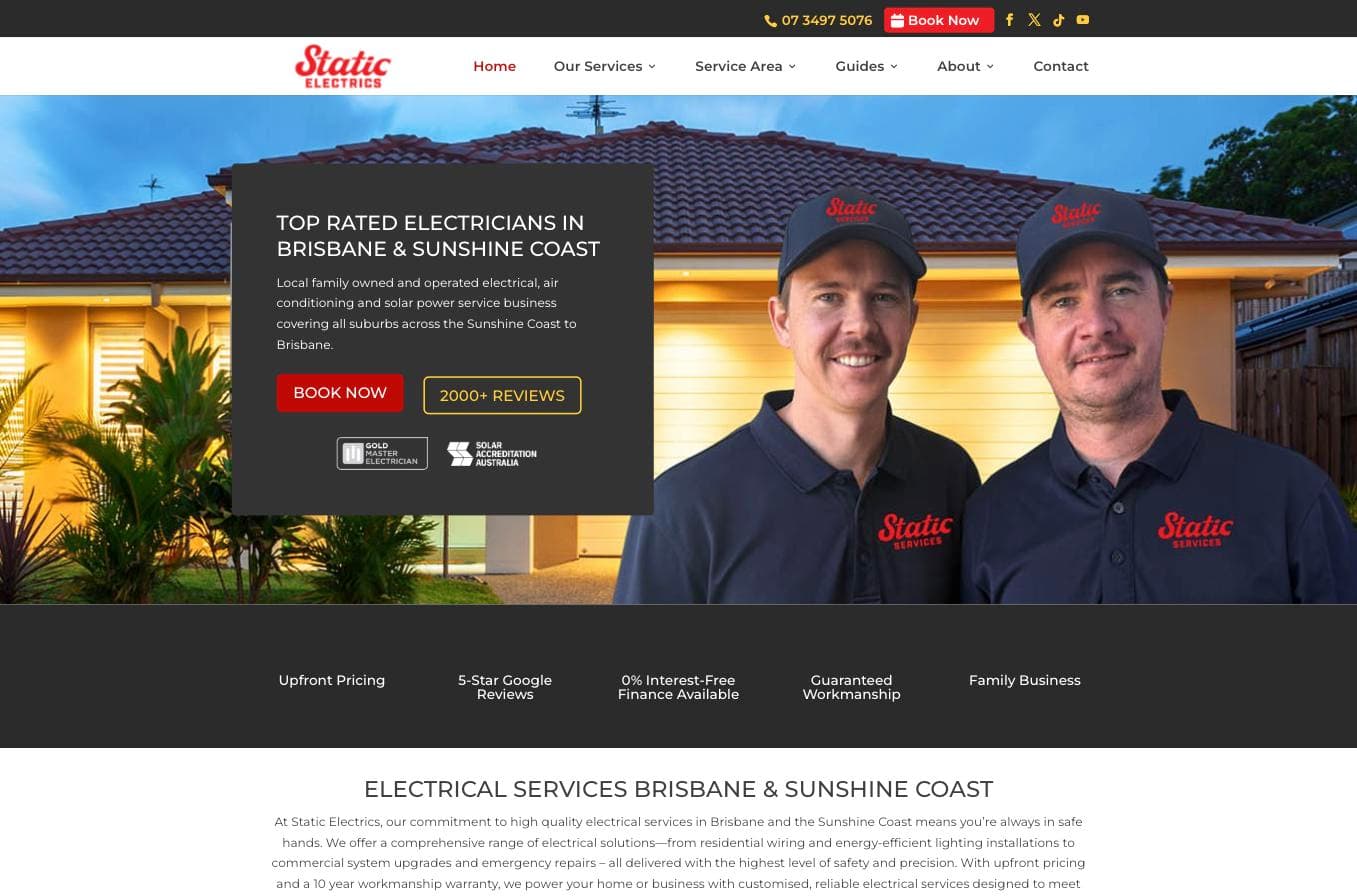
The strongest photography on this list by a clear margin - a genuine dusk shot of two real technicians in branded caps and polos outside a real house, not a stock switchboard or a generic tradie silhouette. "2000+ REVIEWS" sits directly under the headline, backed by a "5-Star Google Reviews" stat further down (2,307 reviews, per the footer). Gold Master Electrician and Solar Accreditation Australia badges sit in the hero, though neither is explained on-page - a real gap. Directors Jarvis and Jordan Robins are named. Service area spans Brisbane, the Sunshine Coast, Moreton Bay, Redland Bay, Gympie and Ipswich - named regions, not a vague "SEQ" claim. The gap: no licence number displayed anywhere on the site, which is a real omission given how much else here is genuinely strong.
What to steal: real, in-context photography of your own people - not posed, not stock - reads as more credible than any badge or number you can put next to it.
4. Adelaide Urban Electrical — Adelaide, SA
adelaideurbanelectrical.com.au
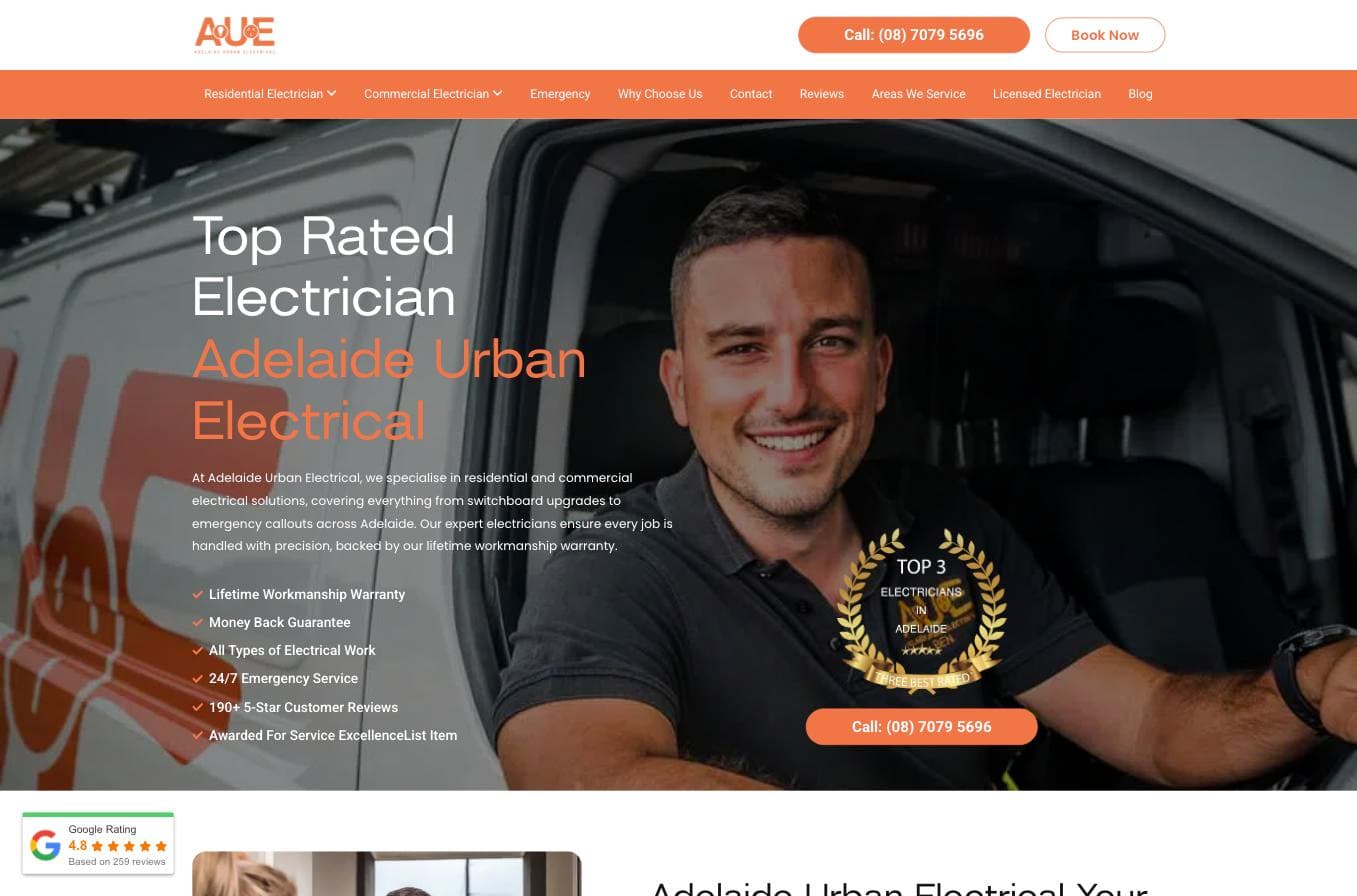
"190+ 5-Star Customer Reviews" is a bullet point directly under the headline, and a "Google Rating 4.8 ★★★★★ Based on 259 reviews" widget sits right at the fold - genuine above-the-fold proof, not buried. A "Top 3 Electricians in Adelaide" award badge sits in the hero too. Further down: 258 reviews with named reviewers - Ryan Taylor, Patrick, Zac - not anonymised initials, and three licence numbers on the page. The call-to-action is specific and low-commitment - a "Free Switchboard Health Check" rather than a generic "get a quote." The gap: the hero photography reads as stock rather than a real job or a real technician.
What to steal: naming real reviewers by first name and suburb. "Ryan Taylor, Norwood" reads as true in a way five stars alone don't.
5. The Local Electrician — Sydney, NSW
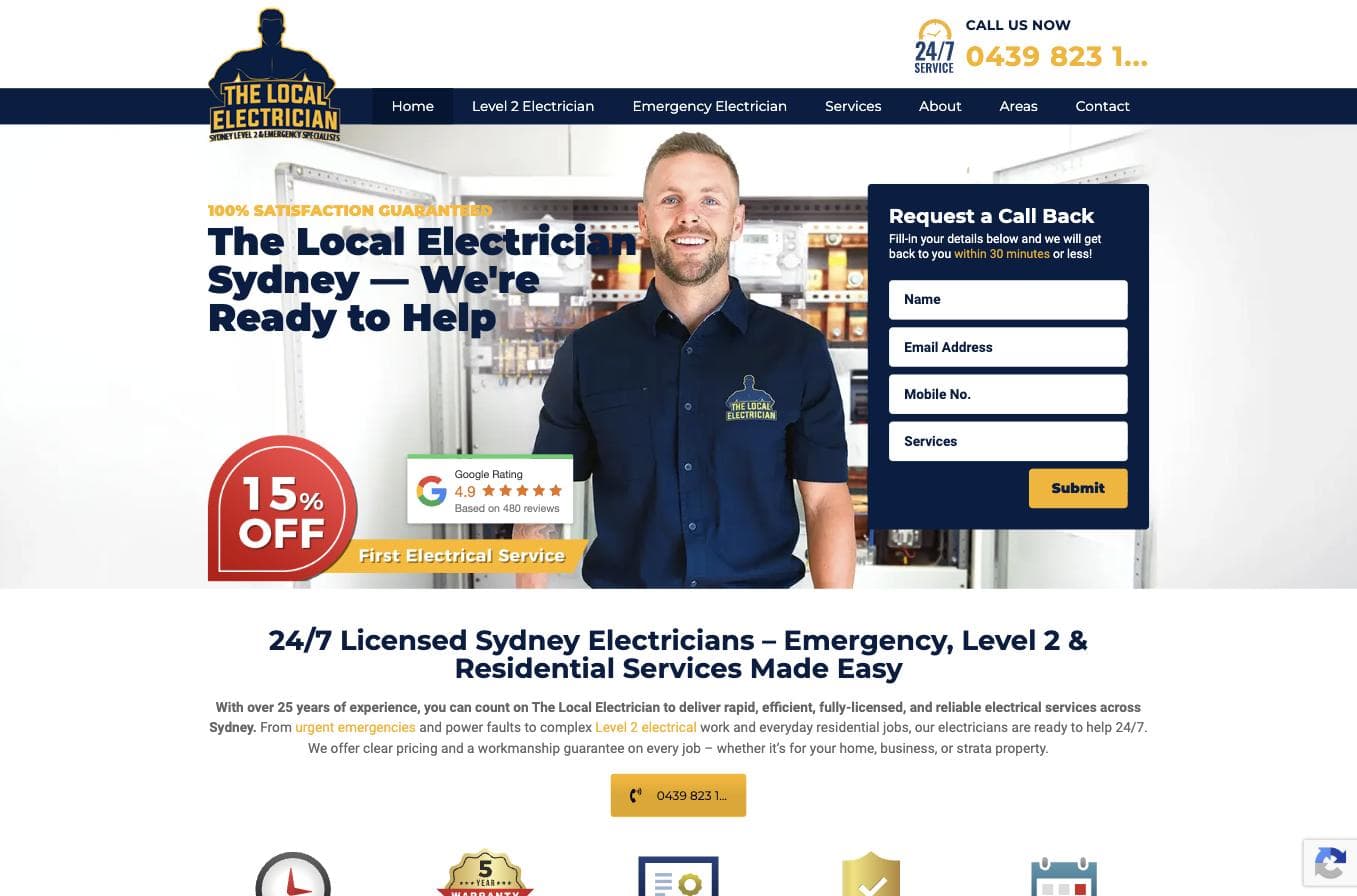
A "Google Rating 4.9 ★★★★★ Based on 480 reviews" widget sits directly beside a real technician photo, immediately visible - no scroll required. 18 named Sydney suburbs and regions, from the Northern Beaches to the Blue Mountains. Licence (324518C) and ABN in the footer. A specific, testable promise - "back to you within 30 minutes" - beats any vague "fast response" claim, and over 25 years of trading history is stated plainly rather than implied. The gap: no real job photos beyond the one technician portrait, image placeholders elsewhere on the page.
What to steal: a specific, numbered response-time promise. It's a claim a customer can hold you to, which is exactly why it works.
6. Hott Electrics — Wollongong, NSW
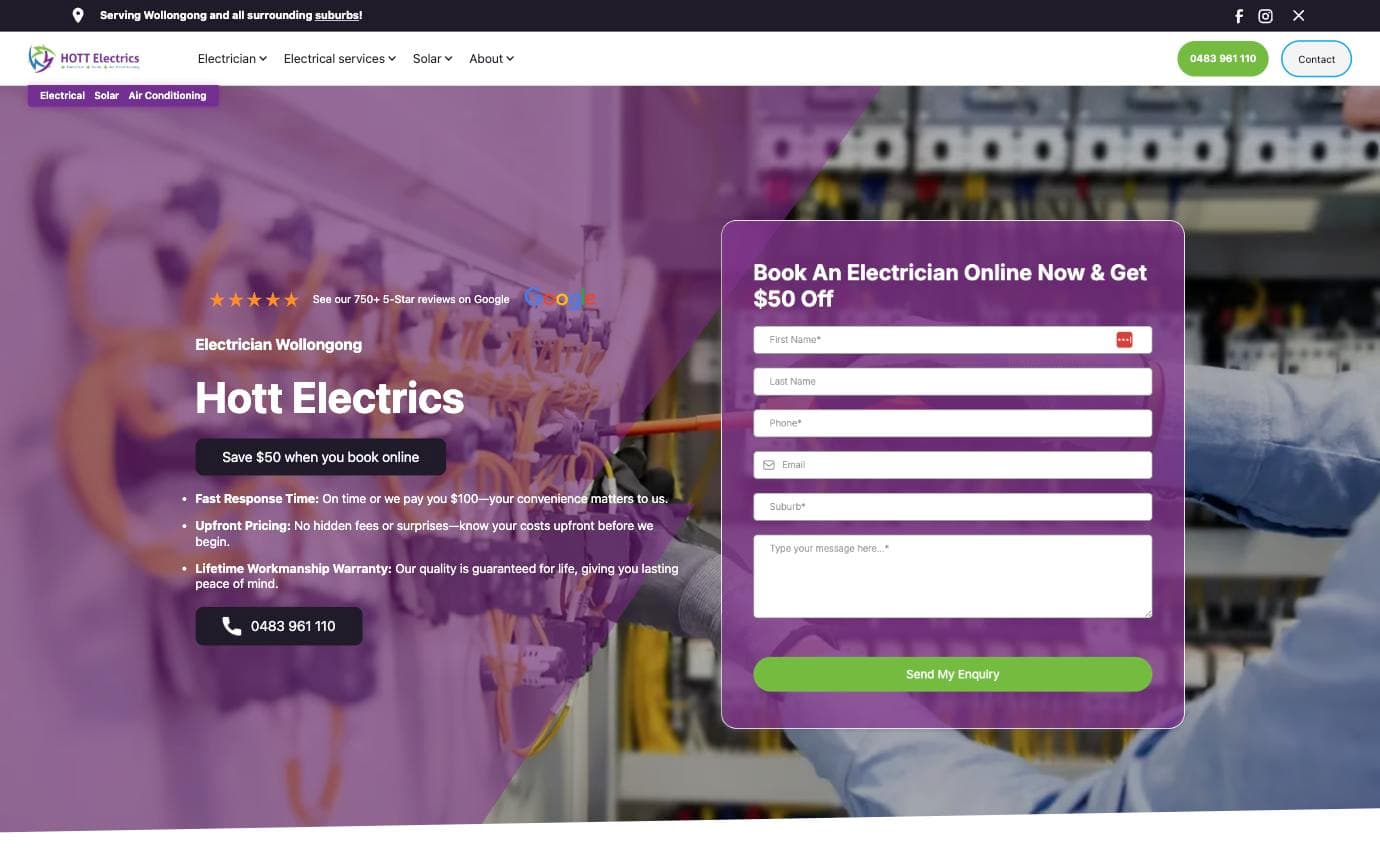
"★★★★★ See our 750+ 5-Star reviews on Google" sits directly under the headline with a real Google logo beside it - clean, immediate, above-the-fold proof. Two unusual, concrete guarantees follow it: $50 off for booking online, and "on time or we pay you $100." Those are real commitments with a real cost if broken, which is exactly why they land harder than "quality guaranteed." The gaps: no licence number displayed anywhere on the site, and no suburbs named beyond "Wollongong and all surrounding suburbs."
What to steal: a guarantee with a real dollar figure attached beats a quality promise every time - it signals you're confident enough to back it.
7. Adamos Electrical — Perth, WA
adamoselectrical.com.au — a ServiceScale build

A real photo of the actual owner, Laurence, standing in front of his van outside a real Perth home - not a stock tradie. A "5.0 on Google" badge with the real Google icon sits top-left, genuinely above the fold, next to "Perth's family-run electricians, since 2016" - a personal, specific tone from the first line, signed "I'm Laurence" rather than a faceless "we." Licence number (EC9219, ECA WA) is visible, and further down the page are six real named reviews - Matthew Hoogenkamp, Aldo Gismondi, Dakota Edmiston among them. Held to the same fold-placement standard as the rest of this list, this one holds up: real Google branding, a real rating, genuinely visible without scrolling. The one gap left: the badge shows the rating but not a review count, unlike the strongest entries above.
What to steal: sign your homepage copy with your own first name, and put your real Google rating right where the headline is. "I'm Laurence" plus a real, branded rating badge above the fold is a stronger combination than either alone.
8. MCP Electrical Services — Newcastle, NSW
mcpelec.com.au — a ServiceScale build
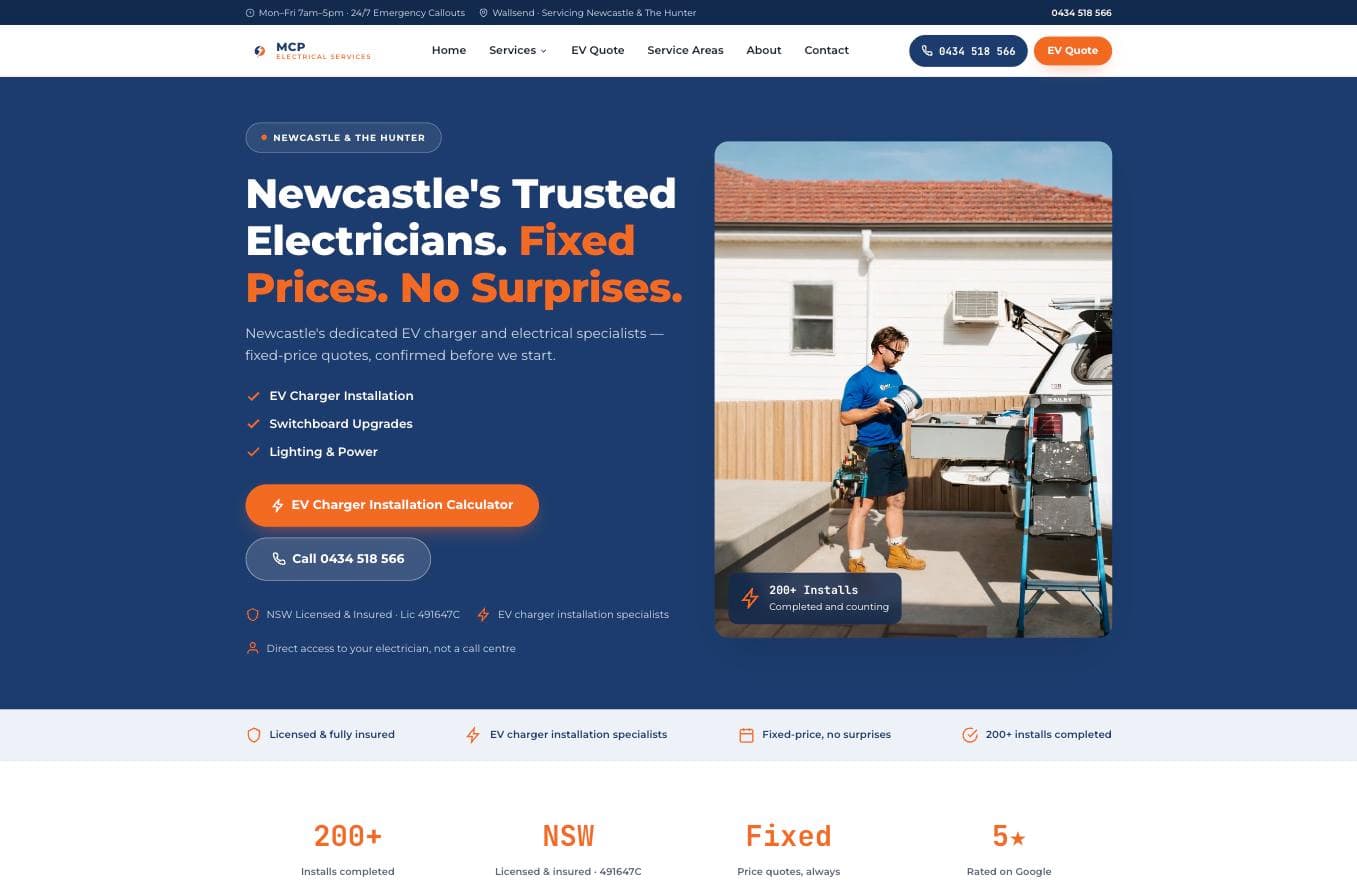
"Newcastle's Trusted Electricians. Fixed Prices. No Surprises." is a direct headline, backed by a real job photo - an electrician mid-install with an EV charging cable reel outside a real house, not stock. A "200+ Installs Completed" badge sits over the photo, and a four-stat row at the bottom of the hero includes "5★ Rated on Google" - real, but a plain text stat rather than a proper Google-branded widget, and it sits right at the fold's edge. Licence (NSW 491647C) and ABN both shown. The standout is a dedicated EV Charger Installation Calculator - a real tool, not another contact form. The gaps: the rating proof is the weakest-placed on this list, and only two real job photos appear on the whole site.
What to steal: narrow, confident positioning - the headline, the calculator and the photo all point at one service. Now pair that focus with a Google rating widget that doesn't need a four-stat scavenger hunt to find.
What Actually Separates These From the Rest
Strip away the differences and the strongest entries here share the same handful of things: a Google rating you can see without scrolling, a service area with real suburb names, and at least one genuine trust signal that would be hard for a competitor to copy - a real award, a real named team member, real job photography.
None of the top entries are trying to look impressive for its own sake. They're answering three questions fast: can I trust this person, do they cover my area, and can I contact them right now. Westline and Luno do it best, backed by real third-party proof and a genuine voice most of the industry hasn't bothered to develop.
Where Electrician Websites Lose Potential Customers
These numbers reflect patterns across Australian tradie websites - they're consistent with usability research and our own platform data. Most electrician websites lose customers on exactly these points. The good news is that every single one of those failure points is fixable without a $20,000 agency retainer - though as this list shows, genuinely distinctive design and real industry recognition are rarer than a working contact form.
Why Most Electrician Websites Don't Convert
The problem usually isn't design in the abstract - it's that most sites stop at "technically functional" and never reach "genuinely distinctive." A lot of electrician websites look fine on a desktop in a browser window. The bigger problem is what happens when a stressed homeowner tries to use that website on their phone at night with one bar of signal.
They can't tap to call. The form has nine fields. The page takes eleven seconds to load. The only photo is a stock image of a bloke who looks like he's never held a multimeter in his life. And somewhere in the footer - buried under copyright text - is the contractor's licence number, which nobody will ever see.
67%
of Australian web traffic now comes from mobile devices
Australian Bureau of Statistics Digital Activity Report 2023
Electrician websites built primarily for desktop are already behind before a customer even arrives.
When a customer lands on your website from a phone, they're asking three questions in rapid succession: Can I trust this person? Do they cover my area? Can I contact them right now? Your website needs to answer all three within the first scroll. If it doesn't, they're gone - and they probably won't come back.
The Non-Negotiables: What Every Electrician Website Must Have
Before you think about colours, fonts, or whether to add a blog, focus on the elements that directly produce enquiries. Everything else is secondary - and Westline and Luno above prove it's possible to nail every one of these AND look genuinely distinctive.
A click-to-call number at the very top. Not in the footer. Not on the contact page. At the top of every single page, formatted as a tap-to-call link on mobile. Electrical jobs are often urgent. People want to call first and ask questions second. Make that as easy as possible.
A specific service area with actual suburb names. "Servicing Sydney" tells Google and your customers almost nothing. "Servicing Sydney's Inner West - Leichhardt, Annandale, Balmain, Rozelle, Lilyfield and surrounding suburbs" tells them exactly where you work and helps you rank for local searches at the same time.
Real photos of your actual work. After every job, take two or three photos. A clean switchboard upgrade, a new EV charger install, a neat GPO run through a freshly renovated kitchen. These do more for trust than any professional copywriter's words. Customers are handing you access to their home - they want to know you're a real person who does real work, not a faceless operation.
A Google rating visible without scrolling. If you've got 60 five-star reviews on Google and a customer has to scroll to find any sign of them, you're leaving your most powerful trust signal sitting unused. Embed the real widget, above the fold - not a claimed number buried mid-page.
Your licence number, visibly displayed. In NSW, that's your Fair Trading electrical contractor licence. In Queensland, your QBCC number. In Victoria, your Energy Safe Victoria registration. Listing it on your website isn't just compliance - it's a trust signal that separates legitimate operators from the dodgy ones a customer might have just had a bad experience with.
One quick win right now
Open your website on your phone right now - not your laptop, your phone. Can you tap to call within three seconds of the page loading? Is your Google rating visible without scrolling? If not, these are your first two fixes, and they'll cost you nothing if you have access to your own site editor.
The 15-Point Electrician Website Checklist
Run your current site through this honestly. Every unchecked box is a potential customer who went elsewhere.
Electrician Website Conversion Checklist
If you ticked fewer than 10 of those, your website is actively costing you jobs. That's not a dig - it's an honest assessment of where most tradie websites sit, and the fix is more straightforward than most people expect.
Before and After: What a Proper Overhaul Actually Looks Like
Here's a scenario that plays out across Australia every month.
Jake runs a two-man electrical business in Adelaide's southern suburbs. His website was built by a nephew in 2020 - it has his logo, a brief list of services, and a contact form that sends enquiries to a Gmail account he checks every couple of days. He's got 22 Google reviews but none of them appear on his site. He gets maybe two or three website enquiries a month, and half of those are tyre-kickers outside his service area.
Jake invests around $4,000–$5,500 AUD in a properly built tradie website. Mobile-first layout, his service suburbs listed clearly, a portfolio of real job photos from the last year, his Google reviews front and centre - above the fold, not buried - a sticky click-to-call header, and a four-field quote form that fires an SMS to his phone the second someone submits it.
Within 90 days, he's fielding 14–18 website enquiries a month. More importantly, the quality is better - people already know his service area, have seen his switchboard work, and are ready to book rather than just shopping around.
This isn't a fantasy outcome. It's what happens when an electrician website is built to convert rather than just to exist - the same pattern behind Westline and Luno above.
Choosing the Right Platform for Your Electrician Website
How to Choose and Set Up Your Electrician Website
Define your budget and hands-on commitment
If you want full control and long-term flexibility, budget $3,500–$8,000 AUD for a WordPress build through a tradie-focused agency. If you need something live fast and you're comfortable doing basic edits yourself, Squarespace or Wix can get you started for $25–$50/month - but know their SEO ceilings upfront.
Gather your content before you start
Before briefing anyone, collect: your contractor licence number, your service suburb list, 15–20 real job photos, your top 5–10 Google reviews, and a clear list of every service you offer. Agencies charge extra when this content trickles in late.
Prioritise mobile speed above everything else
Ask any developer or platform: what's the expected Google PageSpeed mobile score? Aim for 70+ on mobile. A slow site on a shared cheap host will undo every other improvement you make. If someone is promising you a $500 website, ask what the hosting situation is.
Set up your lead capture before you launch
A click-to-call header, a short quote form, and an SMS notification when the form is submitted - these three things should be tested and confirmed working before your site goes live. Don't launch and then figure out the leads side later.
WordPress gives you the most flexibility and the best long-term SEO options. It powers the majority of professional tradie sites in Australia, including several above. Budget $3,500–$8,000 AUD for a well-built site from a decent agency, and expect to pay around $30–$80/month for quality managed hosting.
Squarespace and Wix are genuinely fine starting points if budget is tight - you can be live in a weekend for $25–$50/month. The honest limitations are that your SEO customisation is more restricted, page speed can be harder to control, and you'll hit a ceiling faster if you want to grow into a multi-suburb, multi-service site.
Tradie-specific platforms like ServiceM8's website tools or Tradie Web Guys operate in this space too - they understand the industry, which saves time on briefing, but you're often paying a premium and locked into their ecosystem.
Whatever platform you choose, the content and structure matter more than the technology underneath it. A well-written, clearly structured Squarespace site will outperform a bloated, slow WordPress site every time.
Your 90-Day Website Improvement Timeline
90-Day Electrician Website Overhaul Plan
Fix the critical conversion gaps
Audit your current site against the 15-point checklist. Add your click-to-call number to every page header. Update your service area to list specific suburbs. Install Google PageSpeed Insights and note your starting mobile score. If you don't have real job photos, start taking them this week - even phone shots are fine.
Build your trust signals and lead capture
Embed your real Google reviews widget above the fold on the homepage - not buried mid-page. Add your contractor licence number visibly. Set up a short quote form (5 fields max) with SMS notification to your phone. If your current platform can't do this cleanly, this is the window to brief a developer or switch platforms.
Track, refine, and build on what's working
Set up Google Analytics 4 and Google Search Console if you haven't already - both are free. Check which pages people are landing on and where they drop off. Test your own site on three different phones. By day 90 you should have a baseline of monthly enquiries to measure against going forward.
None of this requires you to be technical. It requires you to treat your website the same way you'd treat a piece of equipment that's central to your business - check it regularly, fix what's broken, and upgrade it when it's holding you back.
The ServiceScale newsletter
Get practical tips for your trade business
Free guides, tools, and insights, delivered when we publish something worth reading.
No spam. Unsubscribe anytime. We only email when we've got something worth your time.
What to Do This Week
You don't need to rebuild your entire website to start seeing better results. The highest-impact changes - a visible click-to-call number, your service suburbs listed clearly, your Google rating above the fold - can be made to most existing sites in an afternoon.
Start there. Run the checklist above on your current site. Be ruthless about what isn't working. Then look back at Westline and Luno above and ask what real, hard-to-copy trust signal you could build - an award, a named team, real photography - not just another badge.
Either way, the goal is the same: a website that answers the three questions a potential customer asks the moment they land - can I trust this person, do they cover my area, and can I contact them right now?
If your site does that well, you'll win more jobs. It really is that straightforward.
A high-converting electrician website isn't about looking impressive - it's about making it dead easy for a stressed homeowner to trust you and contact you in under 30 seconds. Fix your click-to-call, list your service suburbs by name, put your Google rating above the fold where nobody has to scroll for it, and display your licence number. Those four changes alone will put you ahead of most of your local competitors - and if you can add one genuine, hard-to-copy trust signal on top, you're ahead of nearly all of them.
Related guides
- WordPress vs Wix vs Squarespace for Tradies: Which Classic Platform Wins? — the full guide
- Why Your Tradie Website Isn't Getting Leads
- What Makes a Great Service Business Website in 2026
Want it built and wired to your tools? See our websites for tradies.
<!--/campaign-links-->FREE TOOL · WEBSITE QUOTE BUILDER
What would a website actually cost you?
Eight questions about your business, and you get the pages we'd build, the package it lands on and the price. On screen, no call.
Related guides